Manage cookies that are used for advertising, such as ad personalization, remarketing, and ad effectiveness analysis.
10.2.3. Balance recharge
Important points:
- In the account, personal data must be filled in.
- Minimum recharge amount: for Ukrainian users — 50 ₴, for foreign users — 5 €.
- After recharging the balance, services with daily payment, which were deactivated due to lack of funds, are automatically activated.
- The balance can be recharged via anonymous payment.
- Balance recharge does not affect the turnover. Only funds spent on payment for services are counted in the turnover.
Manual recharge
Control panel
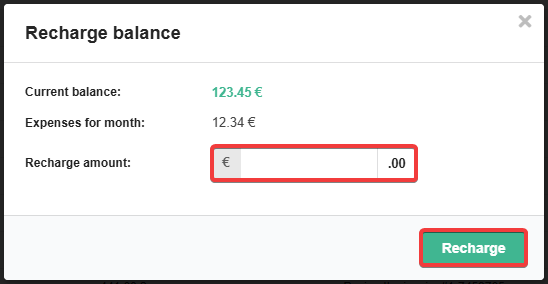
Telegram bot
In the Telergam bot menu, select "Billing → Recharge balance → amount of recharge → Pay the invoice".
Terminal
Attention!
For individuals only.You can recharge your balance through the terminals listed in the Payment methods article. During the payment process, use ID of your account as your personal billing account.
Automatic recharge
Important points:
- For individuals only.
- A linked bank card is required for autorecharge to work.
- Link bank card (if not linked).
- Open the "Balance" section.
- Click "Autorecharge".
- Fill out the form and click "Enable autorecharge":
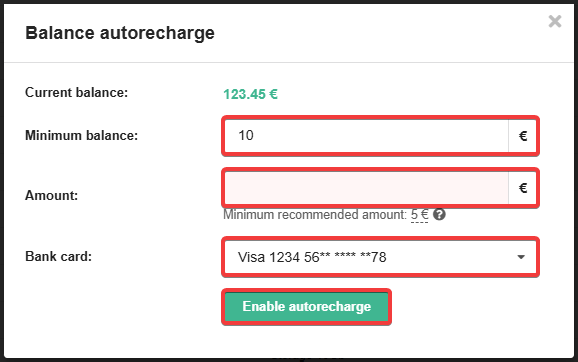
- Current balance — how much is currently on the balance.
- Minimum balance — threshold for triggering autorecharge (when the amount on the balance becomes less than the minimum balance amount, autorecharge will be triggered).
- Amount — the amount to automatically recharge your balance by.
- The minimum recommended amount is either the total of daily service charges for the past 30 days plus 10%, or the minimum recharge amount.
- Card — is a linked bank card.
After successful activation the button "Autorecharge" will turn green and the block "Autorecharge enabled" will appear with information about under what conditions, for what amount and from where the balance will be recharged, as well as the button of deactivation.
(3)