Manage cookies that are used for advertising, such as ad personalization, remarketing, and ad effectiveness analysis.
3.5.2.1. Domain transfer to another registrar
Transfer is not possible if:
- The domain registration period has expired.
- For international domains — less than 60 days have passed since registration or the last transfer.
- For Ukrainian domains — less than 7 days have passed since the last transfer.
- Incorrect full name is specified in the account personal data. In this case, specify the correct full name first.
- Verification procedure initiated but not completed.
Important points:
- During transfer:
- You cannot change NS (you can only change it before the transfer starts or after the transfer is complete).
- DNS records can be changed (on those NS that were in use when the transfer started).
- It is not possible to speed up the transfer.
For .RU and .SU domains see. Transfer of .RU and .SU domains to REG.RU for direct service.
flowchart LR
start([🌐 Domain])
locked(🔒 Transfer
locked) contacts[🪪 Changing
contacts] request[📝 Request
for transfer] subgraph Confirmation code[/🔢 Code to email/] eds[🔏 Signing EDS] end unlocked(🔓 Transfer
unlocked ) authcode[*️⃣ Transfer code
to email] transfer["➡️ Transfer
(5-6 days)"] done([✔️ Done]) start-->locked locked-->|"All domains,
except .UA, .RU, .SU"|contacts contacts-->request locked-->|.UA, .RU, .SU|request request-->|Individuals, FLP,
foreign legal entities|code request-->|Ukrainian legal entities|eds code-->unlocked eds-->unlocked unlocked-->|1-24 hours|authcode authcode-->|Provision of code
to new registrar|transfer transfer-->done unlocked-.->|Manual locking|locked unlocked-->|30 days|locked
locked) contacts[🪪 Changing
contacts] request[📝 Request
for transfer] subgraph Confirmation code[/🔢 Code to email/] eds[🔏 Signing EDS] end unlocked(🔓 Transfer
unlocked ) authcode[*️⃣ Transfer code
to email] transfer["➡️ Transfer
(5-6 days)"] done([✔️ Done]) start-->locked locked-->|"All domains,
except .UA, .RU, .SU"|contacts contacts-->request locked-->|.UA, .RU, .SU|request request-->|Individuals, FLP,
foreign legal entities|code request-->|Ukrainian legal entities|eds code-->unlocked eds-->unlocked unlocked-->|1-24 hours|authcode authcode-->|Provision of code
to new registrar|transfer transfer-->done unlocked-.->|Manual locking|locked unlocked-->|30 days|locked
- Specify your contact information in the domain (the procedure depends on the domain zone):
- For Ukrainian domains (except for .UA) — contacts must necessarily match the data (full name, organization) in the account personal data.
- For international domains (.COM, .NET, .ORG, .BIZ, .INFO, .XYZ, .CLUB, .LIFE, .AUDIO, etc.) — it is allowed to specify other contacts, but they must be real (not made up). It is also necessary to disable contact hiding in the zone registry (Privacy Protection).
- For .UA, .RU, .SU domains — no need to change contacts.
- Open the "Domains" section.
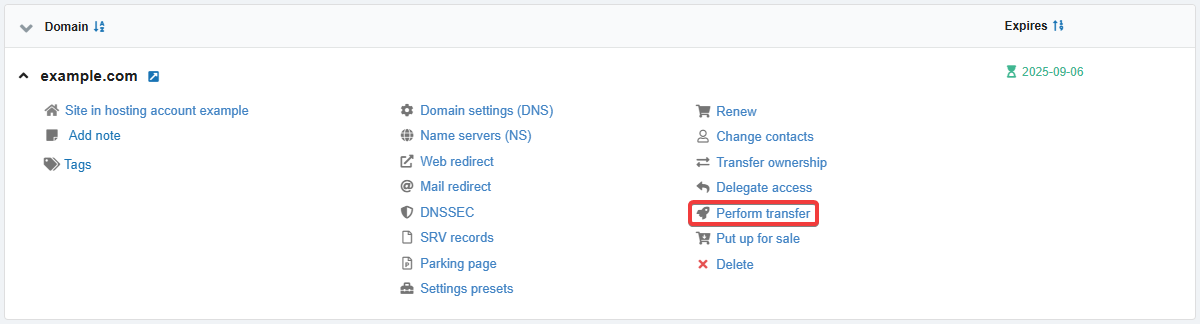
- In the domain menu, click "Perform transfer":
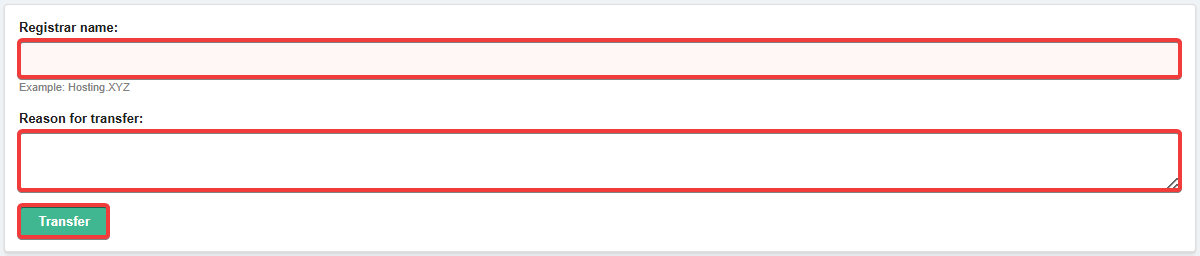
- Enter the name of the new registrar, the reason for the transfer and click "Transfer":
- Confirm to remove the transfer lock:
- Individuals, FOPs, foreign legal entities — using the code sent to account email.
- After the transfer lock is removed, expect the transfer code (AuthInfo/Auth-Code) to be sent to the account email:
- On business days, the transfer code is sent within one or several hours from 10:00 to 18:00.
- On non-working days — 1-2 times a day.
- Provide the obtained transfer code to the new registrar.
The transfer code is valid for 30 days. If the transfer is not started within this period, a transfer lock will be automatically set for the domain. If necessary, you can also set the transfer lock manually.
(5)