Manage cookies that are used for advertising, such as ad personalization, remarketing, and ad effectiveness analysis.
10.4.2.4. Form and upload applications to Paperless
In the accounts of legal entities for performing operations that require documentary confirmation (such as ownership transfer or transfer unlocking), when electronic document management is selected, applications can be formed and uploaded to the Vchasno or Paperless service via the form on our site.
- Register in Paperless (if not already registered).
- Create a request for the desired operation:
- Fill out the form and upload the document:
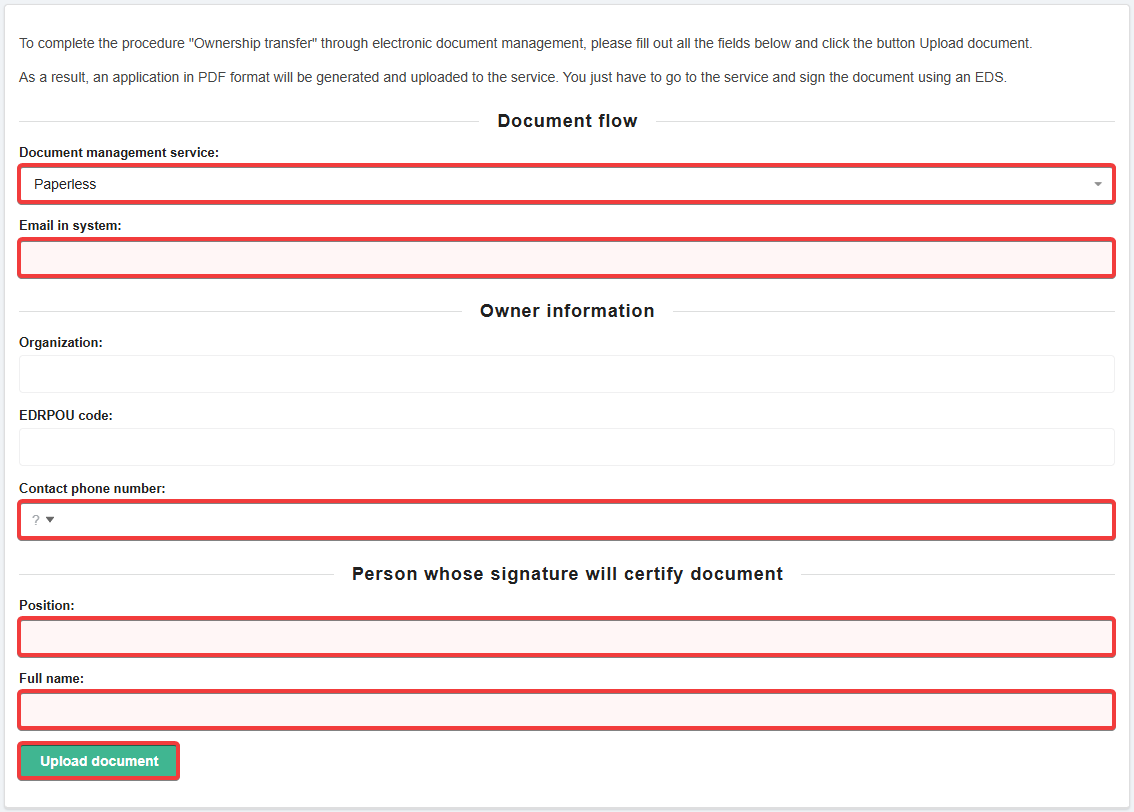
- Document flow:
- Document management service — Paperless.
- Email in system — the email address your Paperless account is registered with (it does not necessarily have to match the account email on our site).
- Owner information:
- Organization and EGRPOU code — your account details on our site (not available for editing).
- Contact phone number — the phone number where you can be contacted if necessary.
- Person whose signature will certify document:
- Position — the position of the person who will sign the document.
- Full name — the full name of the person who will sign the document.
- Depending on the operation being performed, the form may contain additional fields that must also be filled in.
- Sign the uploaded document using your EDS in the Paperless service.
- Wait for the results of the document review (usually within a few minutes after signing).