Manage cookies that are used for advertising, such as ad personalization, remarketing, and ad effectiveness analysis.
3.1.5.8. SRV
Important points:
- SRV records are not intended for pointing a domain to an IP address with a port. DNS can only be used to point a domain to IP addresses without a port.
- The subdomain name can only consist of Latin letters, numbers, the characters
.,_,-and be a maximum of 63 characters long.
SRV are records that define settings for connecting to various services (server address and port, additional settings).
Add
- Open the "SRV records" section.
- Click "Add record".
- Fill out the form and click "Add":
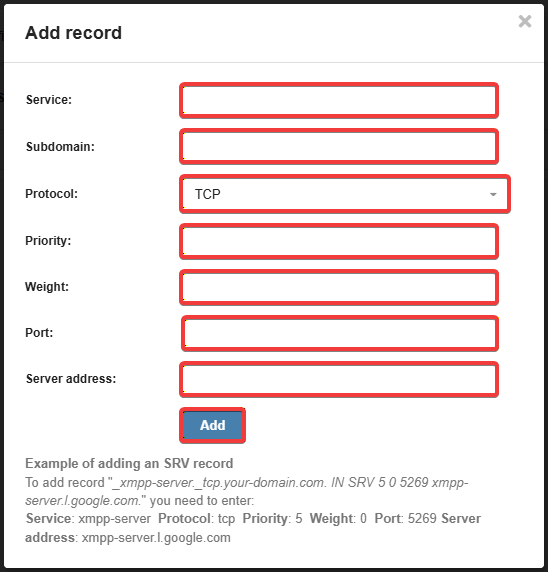
- "Service" — name of the service for which the record is being created.
- The character
_does not need to be specified; it is added automatically.
- "Subdomain" — the name of the subdomain for which the record is being created.
- For the main domain, use the character
@. - The characters
.and_in the name can only be used for theldapservice.
- "Protocol" — protocol of the transport layer that will be used by the service.
- The character
_is added automatically.
- "Priority" — priority of record usage.
- Of two identical records, the one with the lower priority value will be used. The second record will only be used if the first one is unavailable.
- "Weight" — priority for sending requests.
- For multiple records with the same priority, requests will be distributed proportionally among the records according to their weight. The principle behind this value is that two records can be assigned different weights for load distribution, in which case one server will receive more requests than the other.
- "Port" — port used for the service to operate.
- "Server address" — address of the service server.
(1)